|
|
Stand - Alone Video Wall / Multi-Screen
Controller
|
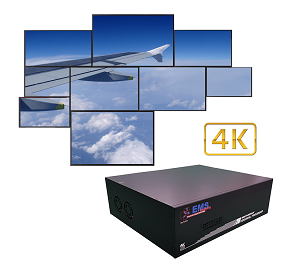
EMS’s iVu4 video wall / Multi-Screen
controller helps in combining 4 (2x2) LCD displays to produce a large video
wall. The iVu4 receives and displays the images or video content on any size LCD
monitor with a selectable display mode and supports a maximum resolution of
up to 1920x1200 per display. The iVu4 is compatible with any brand of LCD
monitor and suitable for large display applications in large advertising,
medical imaging, simulation inc. flight, radar, gaming etc..,
shopping centres, public
gathering locations, fairs and exhibitions, sporting or music
events.
To buy a
large display for advertisement, for example 64 or 84 inches LCD, is too high to
afford. A video wall is a group of smaller displays tiled together in a
matrix to create one large display. EMS provides the
controller box that drives
the display over multi-screens.
All the
video wall controllers support different configurations of the video output
signals. The videowall control (OSD) buttons are located on the
front panel of the video wall controller for easy access, while all the
video and power cables are connected to the rear panel for convenient cabling.
The video controllers can be connected to LCD or DLP panels, video wall
cubes, projectors or any monitor that accepts a DVI input
signal.
The features of EMS iVu4 video wall controller
include:
- Fan-less design for any
implementation
- Provide 1 image source input
(DVI/Component) and 4 DVI outputs to four (2x2)
monitors
The EMS iVu4 video wall
controller supports various display modes that
include:
|
 |
- Clone mode
(1x1): The iVu4 unit displays the same content on the four
screens
- Full mode (2x2): The iVu4 unit divides the input
image into four sections and stretch the ¼ image to
fit to the selected
resolution on each monitor. The full display also support mask
enable and disable
- Vertical Replication mode (1x2): The
EMS iVu4 can project the same image on the top two LCD panels
and bottom
two LCD panels. Use only two LCD panels to create a larger display,
effectively here the
videowall can be split into two sections, each being 1x2
installed on opposite walls with the same display
view.
- Up to 1920x1200
pixel Hi-Def input and up to 1920x1200 output per
display
- On Screen Display/Remote control
functions for selecting; Display mode; Output resolution; Border mask
enable/disable and frame wideness
adjustment.
- Bezel mask or screen border adjustment, this is quite an
important function, normally the display will be
'staggered" from screen
to screen due to the use of conventional LCD/Plasma displays, but with this
function
you can adjust the display to be seamless, e.g
mask-out the screen bezel enabling a visually seamless
display.
- RS-232
communication for remote control (if
required)
- Easy-DIY to
install and control the videowall or multi-screens, either from a PC, Laptop
Remote control or
Front
panel.
-
Multiple units
can be used for larger screen configurations, e.g. by installing a dual
channel graphics card into a PC then two iVu4's can be connected to enable a 4x2 video wall
or multi-screen display or one iVu4 can be cascaded to four further
units to enable a 4x4 videowall / multiscreens. All iVu controllers can be "Mixed
& Matched" to enable various display
configurations.
|

|
-
Optional Live
DVI/VGA video insertion, the
XtremeRGB (optional purchase) can be installed within the PC
that controls the iVu4, this will enable not only
a videowall/multi-screen display with all of Windows applications,
but also live video from other sources that provide DVI or VGA outputs,
such as Servers, Workstations,
Hdmi players, DVI cameras
etc..

Support Various Display
Modes: |
Display Modes Selection
:
| Clone Mode |
|
Full Mode |
|
Vertical Replication Mode |
|
  |
|
  |
|
  |
|
| - Clone mode
(1x1): |
|
- Full
mode (2x2): |
|
-
Vertical Replication mode (1x2): |
|
| The iVu4 displays the same content on the four
screens. |
|
The iVu4 divides the input image into four sections and
stretch the 1/4 image to fit to the selected resolution each
monitor. The full display also support mask enable and
disable. |
|
The iVu4 can project the same image on the top two LCD
panels and bottom two LCD panels. Customers can require only two
LCD panels to create a larger display. |
|
Specifications
|
Features |
1. Mode choice
2. Software OSD
3. IR Remote Control
4. Auto-scaling to fit selected resolution |
| Box Size |
Height: 47mm (with rubber foot
53.4mm)
Depth: 178.2mm
Width: 229.5mm |
| Cooling |
Fanless |
| Front Panel |
6 x LED (1xInput, 4xOutput,
1xPower)
1x 6 keys
1 x IR receiver |
| Rear Panel |
1 x DVI-I input (single link
cable)
4 x DVI output (single link cable)
1 x DC Power in
1 x RS-232
8 x Digital I/O |
| Resolution |
|
Clone, Vertical
Replication, Full and PIP mode
|
|
Input
|
Output
|
| 720 x 350, 640 x
400, |
1024 x 768 |
| 720 x 400, 640 x
480, |
1280 x 1024 |
| 800 x 600, 832 x
624, |
1280 x 1024 |
| 1024 x 768, 1152 x
864, |
1440 x 1500 |
| 1152 x 870, 152 x
900, |
1440 x 900 |
| 1280 x 768, 1280 x
960, |
1680 x 1050 |
| 1280 x 1024, 1600 x
1200, |
1600 x 1200 |
| 1680 x 1050, 1920 x
1200, |
1920 x 1200 |
| NTSC/PAL/SECAM 480
I/P, |
|
| 720 I/P, 1080
I/P |
|
|
| Power Consumption |
20W |
| Power Connector |
DC Power Jack |
| OSD Control |
1. Power On/Off
2. Output resolution selection
3. Display mode selection
4. Input source selection
5. Mask control
6. Bezel wideness adjustment |
| Temperature |
0°C~40°C |
| Safety & Emission |
Meet UL, CE, FCC and
CCC |
| Power Adapter Input |
90VAC to 264VAC / 47Hz to
63Hz |
| Power Adapter Output |
11.52V to 12.48V, 2.1A,
25W |
|
|
| |
| Ordering
Information |
| |
| Part No. |
Description |
| EMS
iVu4 |
Video Wall Control Box, 1 x
DVI Input, 1 x Component Input, 4 x DVI Output, 2 by 2
display |
|
|
| |
| Packing
List |
| |
| iVu4 * 1 |
DC 12V Power
Adapter |
| Power Cord (EU or US) *
1 |
IR Remote Control *
1 |
| RS-232 Cable * 1 |
DVI cable (Length:1.8M) * 1
(Single-link DVI) |
| Component cable
(Length:1.8M) * 1 |
User manual and utility CD *
1 |
| Mount Bracket *
2 |
Screw Kit * 1 |
|

|
|
|